The Context tab#
◎ in the activity bar. What is open, what is on each page, and how to turn a handful of
tabs into something you can work with.
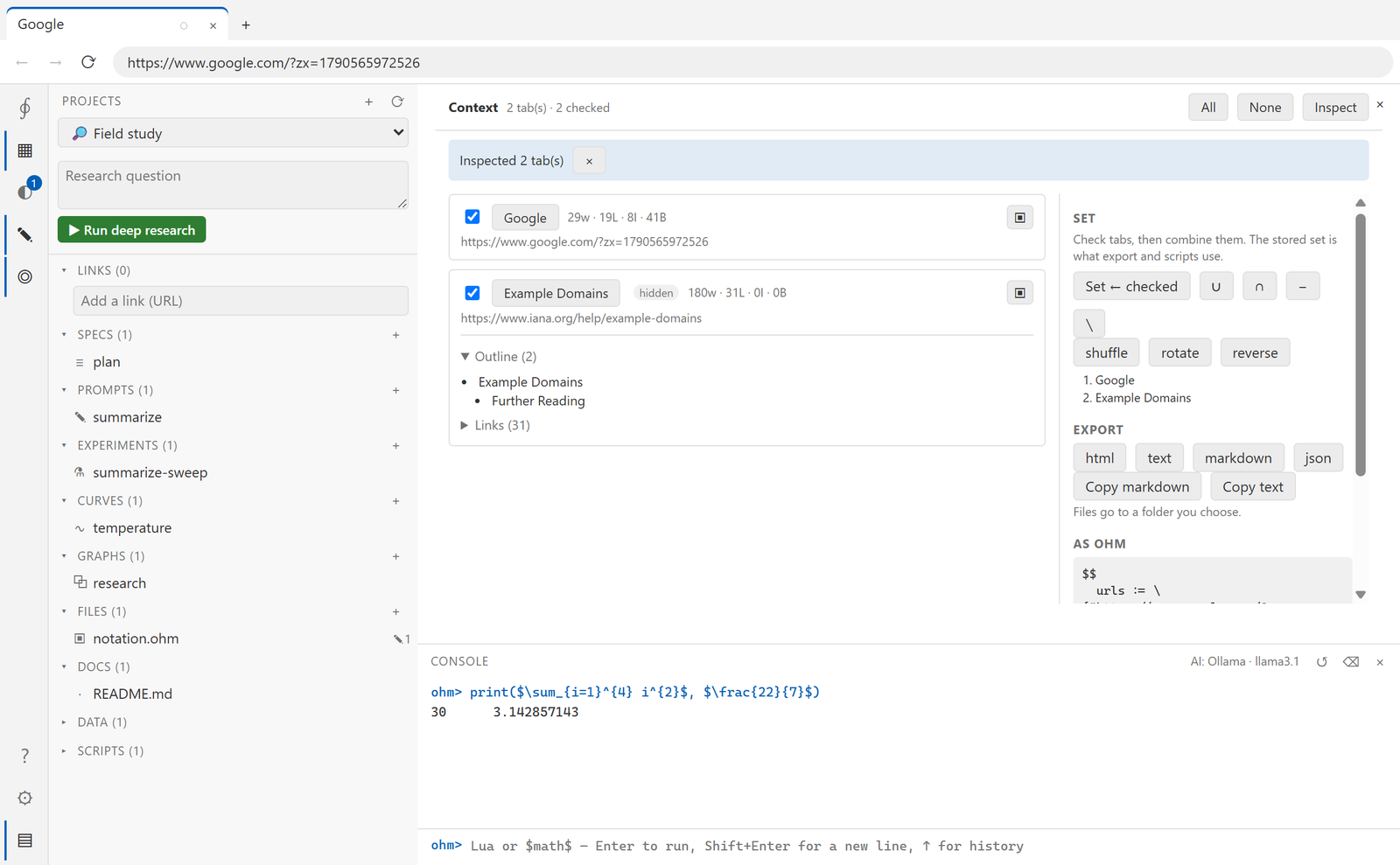
What is open#
Every tab, visible and hidden, with its title and URL. A checkbox on each one builds a
selection; ▣ brings a tab to the front.
What is on a page#
Click a tab's title and Ohm reads the page once, through the debugger, and shows:
| Section | What it holds |
|---|---|
| Outline | every h1–h4, indented by level |
| Inputs | type, label, current value, and a selector that still finds it later |
| Buttons | label, whether it is disabled, and its selector |
| Links | text, target, and a mark on the ones that leave the site |
The header of each tab carries the counts — 184w · 31L · 0I · 0B is words, links, inputs
and buttons — so you can see the shape of a page without opening it.
Two things this deliberately does not do:
- A password's value is never read. The field is listed, its type is
password, and its value is empty. It is not Ohm's to copy out of the page. - Nothing is unbounded. Every list is capped in the page itself, before it crosses back — 300 links, 200 inputs, 200 buttons. Anything cut is named in a "Truncated" line rather than quietly disappearing.
The same reading is available to scripts, from the same code:
local page = browser.open("https://example.com", { hidden = true })
local info = page.inspect()

for _, i in ipairs(info.inputs) do
  print(i.type, i.label, i.selector)        -- the selector you can tab.type() into
end

print(page.markdown())                      -- the whole thing, as markdown
Tabs as a set#
The panel keeps two things: the tabs you have checked, and a stored set. Set ← checked puts one into the other, and then the operators combine them:
| Button | Meaning |
|---|---|
∪ |
union — the stored set plus the checked tabs |
∩ |
intersection — tabs in both |
− |
difference — the stored set without the checked tabs |
∖ |
the checked tabs without the stored set |
| shuffle · rotate · reverse | reorder the set, the same way S.Shuffle, S.Rotate and S.Reverse do in a script |
The result is an ordered list, and the panel shows the Ohm that would build it:
$$
  urls := \{"https://example.com", "https://iana.org"\}
  T    := \Tab \times urls
$$
Copy takes that expression; Run it executes it. Clicking here is meant to teach the notation, not to replace it.
Carrying on in a script#
Whatever the panel has selected, a script can pick up:
local T = context.selection()      -- a matrix of tabs, ready for × and the S.* operators
print(#T .. " tabs selected")

for _, page in ipairs(context.inspect()) do
  print(page.title, page.counts.words)
end

print(context.expression())        -- the same expression the panel shows
Because context.selection() is a matrix, everything in
the language guide's operator section applies to it — \Summarize_{\Psi}
across the set, S.Chunk to batch it, <- to send the results somewhere.
Export#
| Format | What you get |
|---|---|
| html | the page's own outerHTML, unmodified |
| text | innerText — what a reader sees |
| markdown | the inspection: outline, forms, buttons, links |
| json | the inspection as data |
Each writes one file per tab into a folder you choose, named from the page title. Copy markdown and Copy text put the same content on the clipboard instead.
A tab that will not give up its content — discarded, crashed, or navigated mid-export — reports its reason and the others still come through.