Specs#
The spec editor is a hierarchical, typed outline for planning work — requirements, APIs, data models, flows, tests, risks and open questions — with references that point at real things in the project.
Specs live in specs/<name>.spec.json and appear under Specs in the Projects panel.
Nodes#
Every node has a title, a kind, a markdown body, a status, a priority and tags.
| Kind | For |
|---|---|
section |
grouping |
requirement |
something that must be true |
api, component, data-model |
interfaces, parts, shapes |
flow, state |
behaviour over time |
test |
what proves it |
task |
work to do |
prompt |
a prompt you can run from the editor |
reference, note, question, decision, risk |
everything else |
Statuses are none, todo, doing, blocked, review, done, cancelled, rendered as
☐ ◔ ⛔ 👁 ☑ ✗. The header shows a progress bar: done ÷ tracked, where "tracked" excludes
none and cancelled — so notes and abandoned work do not dilute it.
Editing#
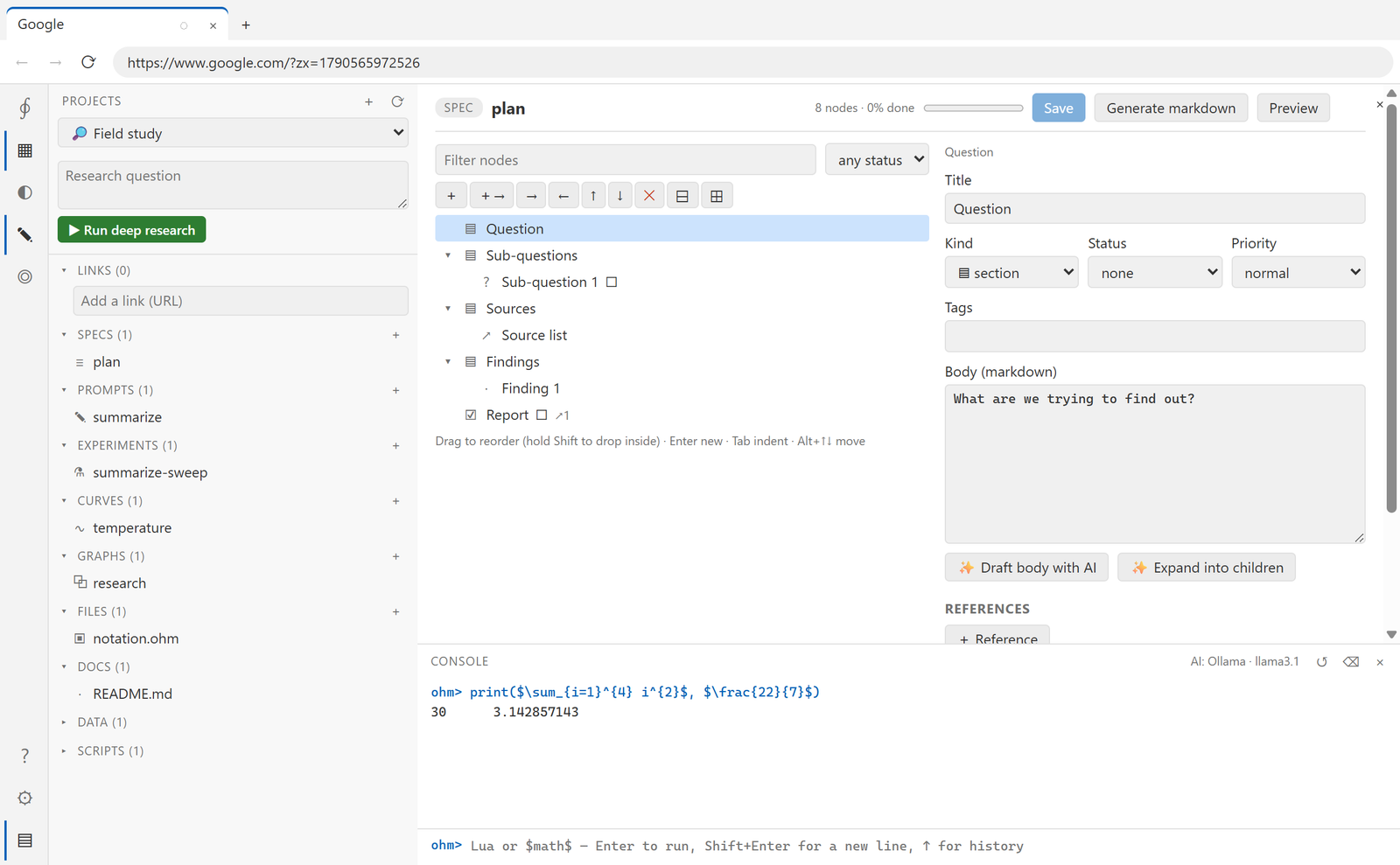
The tree is keyboard-first:
| Key | Action |
|---|---|
| ↑ ↓ | move |
| → ← | expand / collapse |
Enter |
new sibling |
Ctrl+Enter |
new child |
Tab / Shift+Tab |
indent / outdent |
Alt+↑ / Alt+↓ |
move within siblings |
Delete |
remove |
Drag a row to reorder it; hold Shift (or Alt) while dropping to place it inside the
target. Filter by text or by status; collapse and expand everything from the toolbar.
References#
A node can point at things that exist:
| Kind | Target |
|---|---|
prompt, curve, graph, experiment, spec |
another item in the project |
doc, data, script |
a file, optionally with a line number |
link, url |
a project link or any URL |
node |
another node in this spec |
Open jumps straight there — a script reference opens the editor at the line, a URL opens a tab. Tick blocks to mark a dependency rather than a plain reference; blocking references are drawn as solid edges in the generated graph.
Prompt nodes#
A node of kind prompt carries a prompt, a model profile and its parameters, and can be run
right there. The reply is kept on the node, and one click copies it into the body — useful
for "draft this section" or "list the edge cases" while you are writing the spec.
AI actions#
- Expand into children — turns a node into 3–6 child nodes, each with a one-line body,
marked
todo. - Draft body — writes a short paragraph for the node and appends it.
Both use whichever model profile is active.
Markdown#
Generate markdown writes docs/<name>.spec.md with front matter (title, node count,
progress), a table of contents, every node as a heading with its status mark and badges,
its references as a list, and a mermaid graph of the links between nodes. Preview shows
the same thing without writing.
Generating always overwrites
docs/<name>.spec.md, so do not hand-edit that file.
History#
Every save snapshots the previous version, keeping the last 50. History in the detail pane lists them and restores one into the editor, leaving it dirty so you decide whether to keep it. The same history applies to prompts, curves, experiments and graphs.
From a script#
local doc = specs.get("plan")
doc.nodes[1].status = "done"
specs.save("plan", doc)
print(specs.markdown("plan", true))   -- writes docs/plan.spec.md, returns the path
This repository uses it#
docs/specs is a specification of Ohm itself in exactly this format —
generated from data, published as both markdown and .spec.json, and openable in this
editor.