Scripts#
Scripts live in Documents/Ohm (override with OHM_SCRIPTS_DIR). They are plain files in
a folder you own — visible in your file manager, trackable in git, and readable by other
scripts.
Three kinds run, and the Run button appears for all three:
.ohm |
Ohm — Lua 5.4 with LaTeX maths. Compiles to Lua and runs. |
.volt |
Volt — parsed into a graph, which is then evaluated. No model involved in getting there. |
.bolt |
Bolt — English, translated by a local model into a program that must compile before it runs. |
On first start the folder is seeded with working examples:
ai/agent.ohm  ai/compose.ohm  ai/parallel.ohm  ai/research.ohm
models/list-models.ohm  models/download-gguf.ohm
models/download-web-model.ohm  models/compare-profiles.ohm
browse.ohm  math.ohm  memory.ohm  welcome.ohm  README.md
volt/01-lists.volt … volt/07-sketch.volt
bolt/research.bolt  bolt/compare.bolt  bolt/cheapest.bolt  bolt/README.md
A folder of examples you have never had is added when Ohm starts, so a new set arrives on upgrade. A group you already have is left alone entirely — an example you deleted stays deleted, and one you edited is never overwritten.
README.md there is the language reference. Settings → Scripts can restore the examples
without touching your own files.
The Scripts panel#
Ctrl+Shift+E. Create files and folders with + and ⊞, rename with F2 or a
double-click, and run a script by hovering it and pressing ▶.
Deleting moves to .ohm/trash rather than unlinking, so a misclick is recoverable. The
.ohm folder also holds script memory and screenshots and is hidden from the tree.
The editor#
- Ohm syntax highlighting, and completion after
\and afterbrowser./tab. - Live syntax errors from the real compiler
- A Code / Math / Lua switch (see below)
F5save and run,Ctrl+Ssave,Shift+F5stop
Completion, hover and signature help#
Typing \ offers commands and every operator with its family and signature; typing a dot
after a host object (browser., tab., ai., lib., remote.…) offers that object's
members; and lib. offers the library entries that actually exist. Hovering explains
whatever is under the pointer, and inside a call the argument list stays visible with the
current argument highlighted — for \CoT_{\Psi}(q; C) as much as for tab.waitFor(sel, ms).
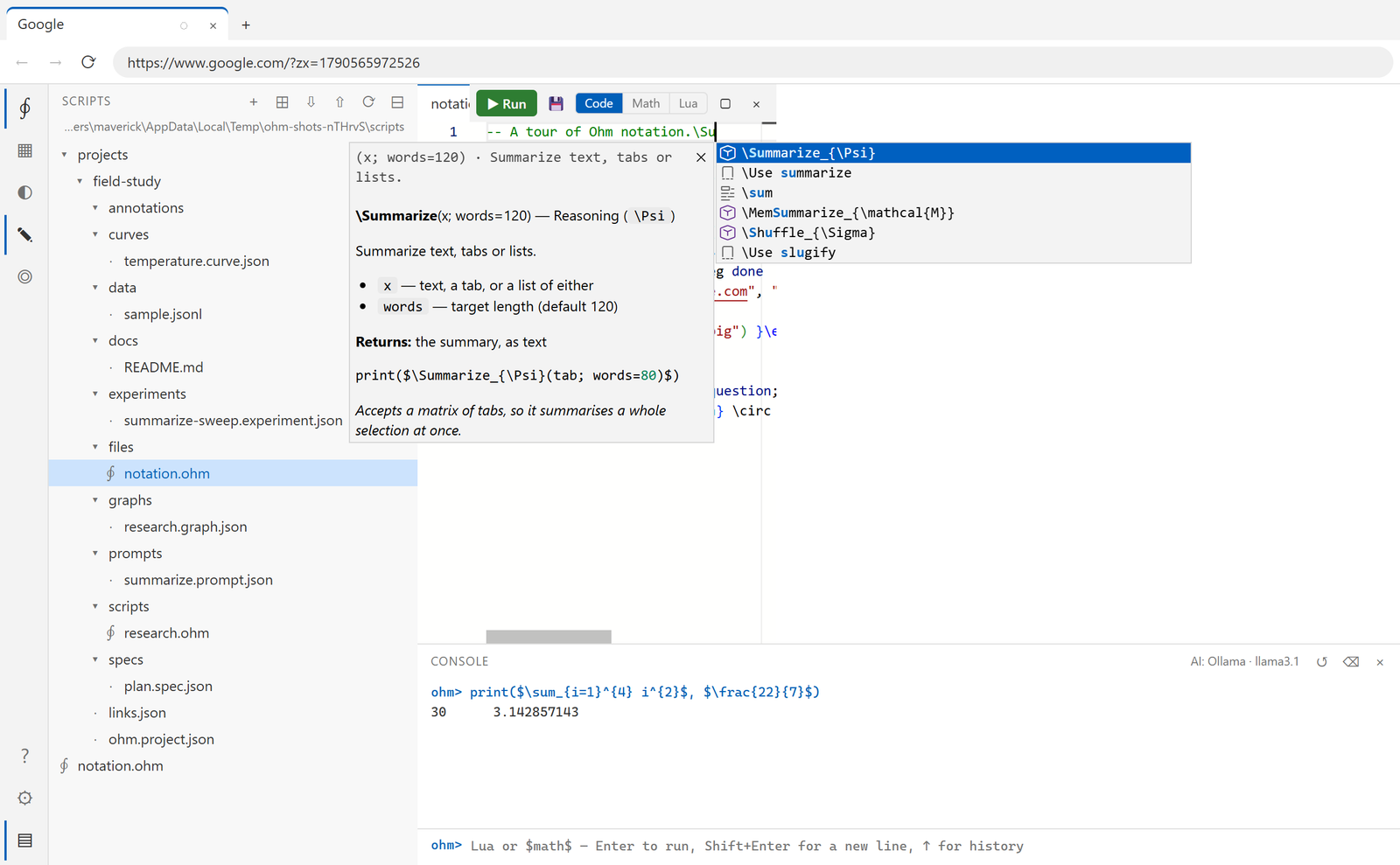
The documentation beside the list is the same text as the operator reference — both are generated from the operator registry, so the editor and the docs cannot drift apart.
Each of those is a switch in Settings → Editor:
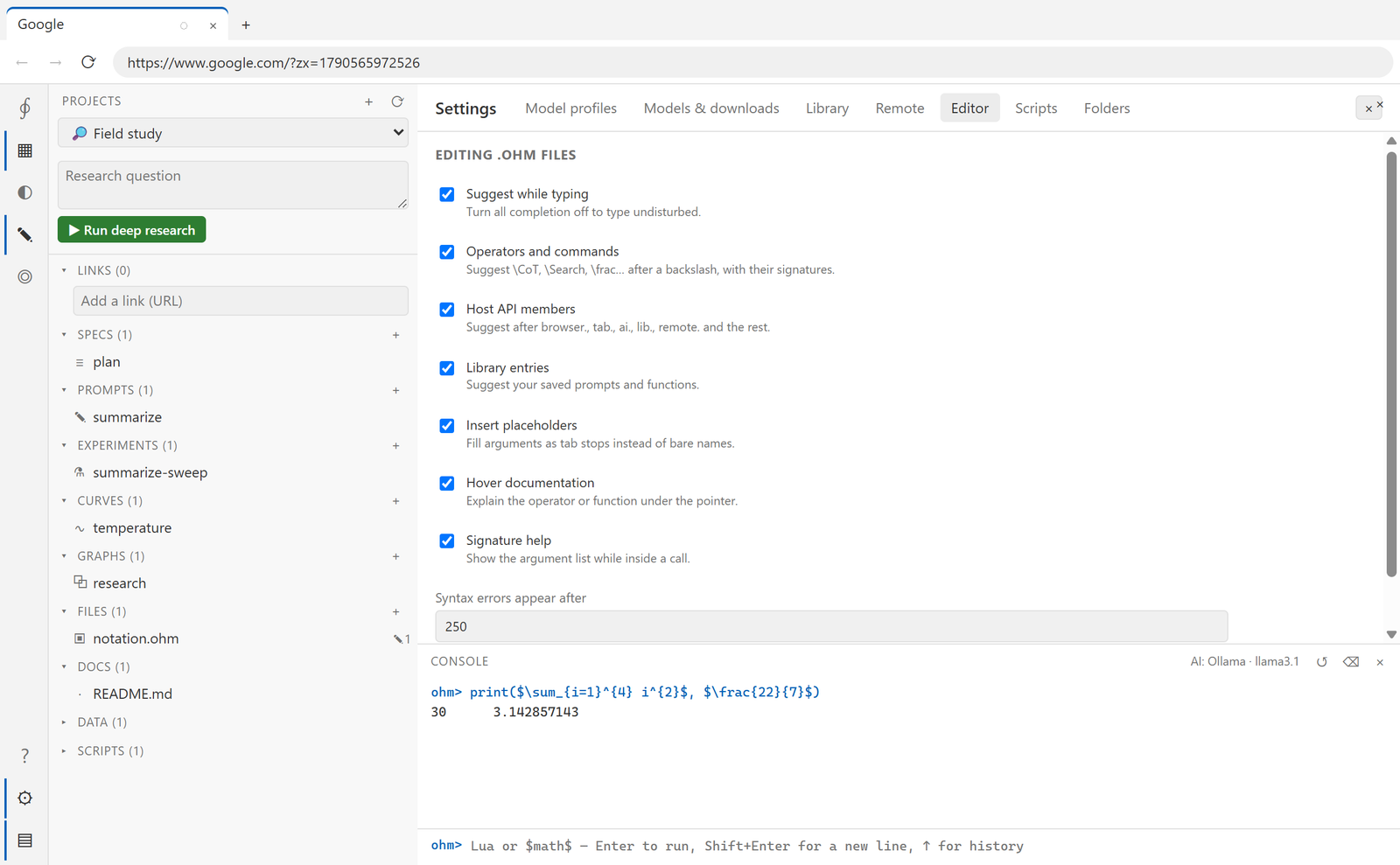
| Setting | Effect |
|---|---|
| Suggest while typing | the master switch — off means no completion at all |
| Operators and commands | \CoT, \Search, \frac… after a backslash |
| Host API members | suggestions after browser., tab., ai., lib., remote.… |
| Library entries | your saved prompts and functions |
| Insert placeholders | arguments as tab stops rather than bare names |
| Hover documentation | explain the operator or function under the pointer |
| Signature help | the argument list while the cursor is inside a call |
| Syntax errors appear after | the idle delay in milliseconds before the compiler runs |
Reading the math#
The toolbar switches between three views of the same file:
| View | Shows |
|---|---|
| Code | the source, editable |
| Math | the LaTeX typeset — $\frac{22}{7}$ becomes a real fraction |
| Lua | the compiled output |
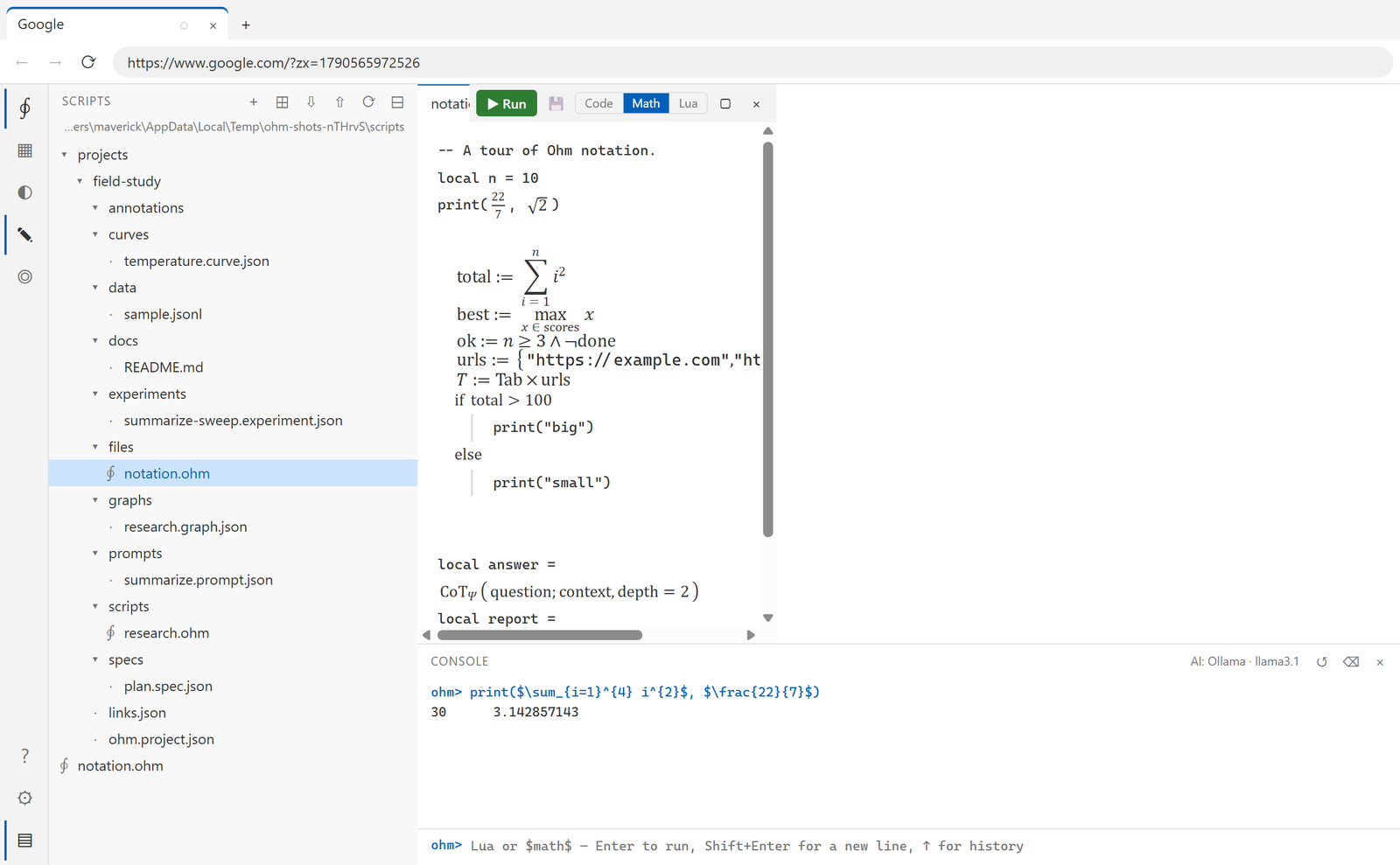
In the Math view the Lua stays as code and only the math regions are typeset, so the file
still reads as a program: a \sum_{i=1}^{n} i^{2} becomes a ∑ with its limits above and
below, \CoT_{\Psi}(q; C) becomes CoT with a Ψ subscript, and \mathcal{M}["last"]
becomes ℳ["last"].
Click any formula to flip that one back to its LaTeX, and click again to typeset it — so you can check the source of a single expression without leaving the view.
Two things worth knowing:
- The typesetting comes from the compiler's own parser, so it understands Ohm's operators
(
\CoT_{\Psi},\Retrieve_{\Gamma}) which a general LaTeX renderer would reject. - It is therefore honest: a region the compiler would refuse is shown as its source with the error, not as pretty output.
The same switch appears when a .ohm file is opened from a project's Files section, where
annotating happens in the Code view.
Because compilation preserves line numbers, an error at .ohm line 12 is reported at line
12 and clicking it in the console jumps there.
Running#
Runs stream their output live to the console on five streams: out (print), info, warn,
err, and result (bare expressions and the return value).
Shift+F5 stops a run. Stopping terminates the worker thread, so it works even on a script
stuck in a tight loop with no host calls — at the cost of discarding that session's state.
One run at a time per session; the run history is pruned automatically.
Arguments and context#
Every script gets ctx:
print(ctx.script)        -- this script's path
print(ctx.project)       -- the project it belongs to, or nil
print(ctx.args)          -- arguments passed to the run
A script under projects/<id>/ is automatically bound to that project, whichever project is
active. A loose script uses the active project and tells you clearly when there is none.
Memory#
\mathcal{M} (mem in Lua) persists between runs of the same script:
$$
  \mathcal{M}["runs"] := (\mathcal{M}["runs"] or 0) + 1
$$
print("run number", mem.runs)
It is re-read after every run, including one that failed, and written back only when it changed.
Files#
fs is confined to the scripts folder:
fs.write("notes/today.md", "# Notes\n")
print(fs.read("notes/today.md"))
for _, name in ipairs(fs.list("notes")) do print(name) end
Anything that resolves outside the folder — or into .ohm — is refused.
Import and export#
Settings → Scripts, or the ⇩ and ⇧ buttons in the panel, import a folder and export the
selection or everything. Nothing is ever overwritten: a clashing name gets a numbered
suffix.
For a whole project — items, documents, annotations and all — use a bundle instead.